
Stop Writing Specs for AI
Let AI write them by interviewing you instead

In my last post, I wrote “if a skilled AI practitioner can produce a really good specification and manage a really good process that AI follows, AI can do an incredible job of building complicated systems.” That’s great, but it leaves us with the questions of what is a really good specification and what is a really good process — and how do we create both. As it turns out, there’s the usual answer, and then there’s the unusual but easy answer.
Let’s start with specifications, and for illustration purpose, we’ll start with one that is definitely not a good specification, but one that is representative of what people might feed into AI in a vibe-coding attempt:
Weather Planner App
This is an application that is designed to help people plan their day around the weather. It helps them understand:
What will the temperatures be throughout the day?
What will the precipitation be throughout the day?
When does the sun rise? Set?
The forecast for the next several days
The App will present itself in a web form. Fixed at the top of the page will be a summary of the weather forecast. Below will be a chatbot that allows the user to ask questions about the forecast.
You could have a perfectly reasonable application in mind and enter this into the prompt of a vibe coding tool like Claude Code. When I did, it asked me three questions: what data provider, what LLM provider, and how to figure out where the user is, and this is the app it gave me:
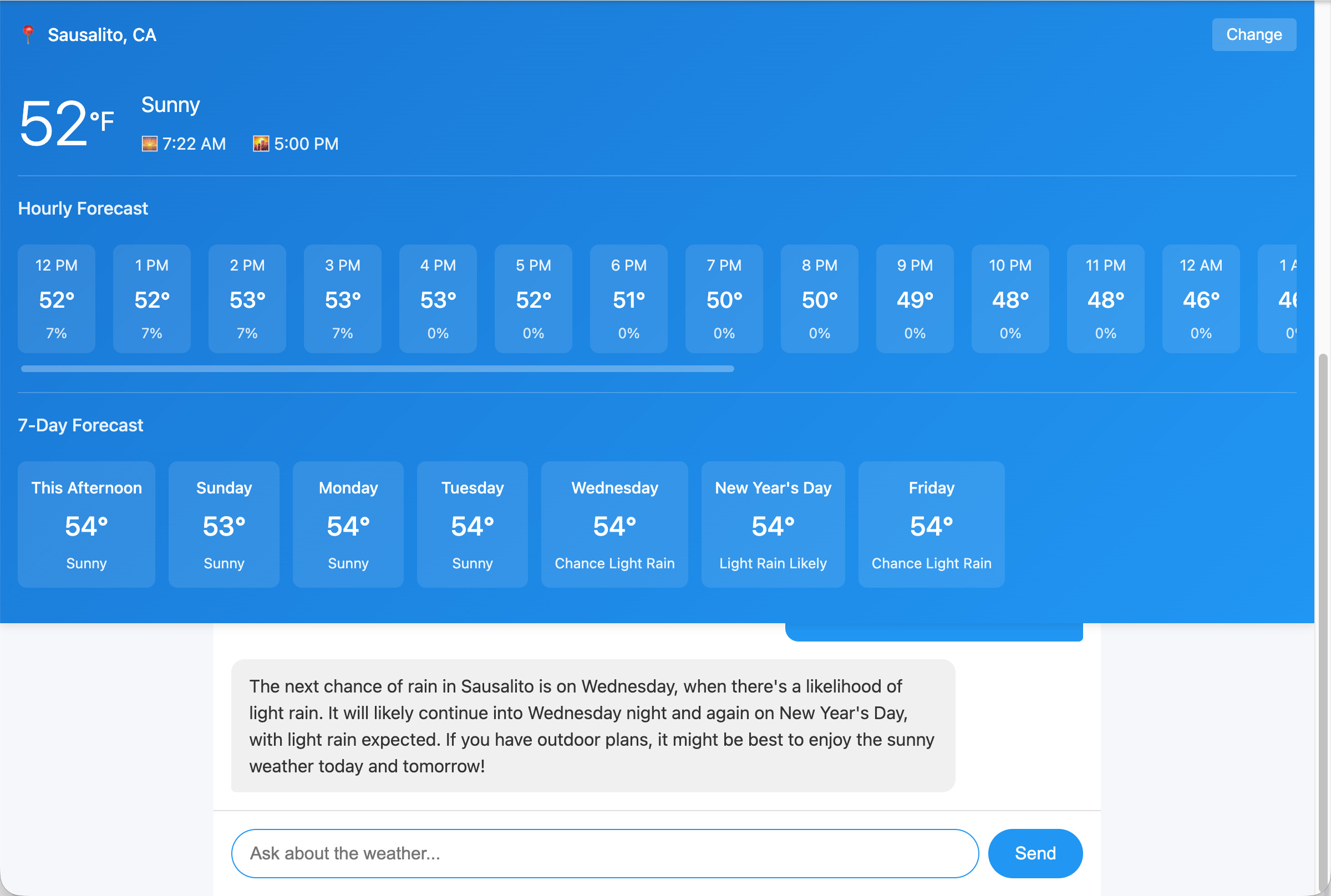
There’s all sorts of things wrong with this, as you might expect:
It got my location wrong, Sausalito is 40 miles from here and it can have dramatically different weather (where I am is 40 degrees, not 52 degrees, at the moment)
The chatbot slides under the forecast and is almost unusable.
The chatbot is using gpt-4o-mini, which was released a year and a half ago. This is typical behavior of LLMs who have knowledge cut-offs that prevent them from knowing about the latest models.
The UI is not that good; the AI didn’t use any sort of framework and just went with plain HTML/CSS and it isn’t a great designer.
… and that’s just the start of its woes.
At this point, there are two choices. (1) Try to perform numerous, incremental revisions to the application to get it to what you want or (2) revise the specification to have a lot more detail and toss out the first try. The revision process (#1), from experience, tends to get you bogged down at some point and have you run out of patience far sooner than you run out of improvements to make. So the best approach is to create an expanded specification that covers the application details in depth. You still can start with a simple spec, but then you try to think of all the design and implementation decisions that have to be made and augment the specification with the choices you want it to make. You can even use the failed first attempt as a source of negative examples.
For example, you might add to the spec that you want it to use gpt-5-nano as your model (because it’s new, decent, and cheap), to prevent it from picking older and more expensive gpt-4o-mini. You could write that you want it to use BootStrap or Tailwind or some other modern CSS framework to style the application. You might suggest that 1/3rd of the vertical space be for the forecast and 2/3rds be for the chatbot. And you might … hey, this is taking a while!
When you finally get to the point where you think you’ve proactively answered most of the questions AI might have, the reality is that you’re still guessing where you need to be explicit to keep AI on the rails. So much effort with so little certainty. Are you saving any time over just building it yourself? You can enlist AI to help review the spec to find things you’ve missed. But it is still a lot of work to grind out the complete specification.
The worst thing about this is that you’re kind of doing it wrong: Instead of your owning the task and shouldering the burden of enhancing the spec, you should let AI own the responsibility for that. But how do you get it to do a good job? After all, it wasn’t so hot at writing the code, so why should be good at writing a spec?
It’s all in how you get it to revise the specification.
Put AI in the role of the developer who is interviewing you, the product owner, as part of the discovery process to get all the information that is needed for the specification. It needs to do a thorough job of interviewing you and make sure it covers all your issues. Start with (for example) the vibe-coding specification above (the one that produced the mediocre application) and put it into a file “specification.md”, and then tell Claude Code:
I have a kernel of an idea in specification.md. Help me develop it into a complete specification through requirements gathering:
1. Read specification.md
2. Ask me questions one at a time to flesh out all aspects
3. Update specification.md after each answer to capture decisions
This should take 25-100 questions depending on complexity.
Goal: A spec complete enough that a developer could implement it correctly without further clarification.
When I entered this prompt, Claude Code launched into asking all sorts of questions, such as:
For the chatbot functionality, which AI service would you like to use?
What specific information should appear in the fixed weather summary at the top of the page?
How should the app handle different screen sizes and mobile devices?
What example questions should be shown to users when they first open the chatbot?
Are there specific third-party libraries you want to use?
And on and on. Each of these questions came with a list of options, one of which was almost always what I wanted, which made the process fairly easy:
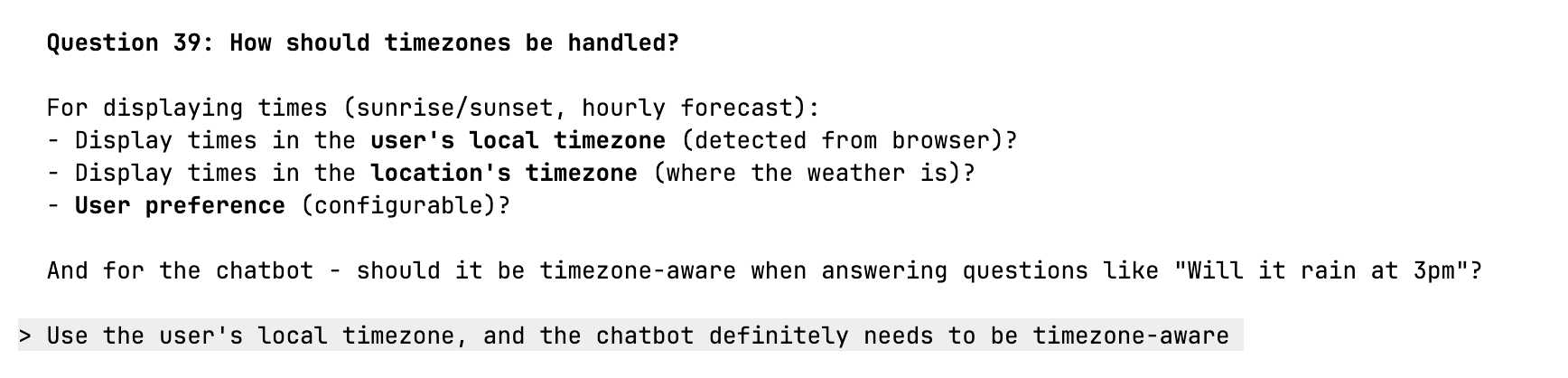
As an aside, that 2 or 3 ideas for each question that were not what I wanted hinted at all the places the naive vibe-coding could (and often did) go wrong.
In the case of the weather app, Claude Code asked me about 50 questions on all sorts of topics from UI design to server architecture to AI integration to functionality. It took me about an hour to work through the list, mostly because Claude Code took time updating the specification and then thinking about the next question in-between: I was faster at answering than AI was at asking!
When we were all done, I had a specification that covered a lot of topics, many I hadn’t even considered yet (e.g., rate limiting).
The specification it generated is a solid specification, but it would be a mistake to toss it at AI and say “build this”. What’s the process to follow for building the application? Failure to plan is planning to fail as the very trite saying goes. So let’s have a process with a plan.
A brief digression here is warranted. When you look at the what the most sophisticated developers are doing with Claud Code, it turns out they treat at a platform that they build (or deploy) all sorts of tools into. Claude Code supports native skills and agents, and can call services in MCPs. These can be structured to run in isolation and in parallel, and the most sophisticated developers have invested a lot of work into making Claude Code wring out the last drop of performance.
How to do that is far beyond the scope of this article, but that’s not a worry, because we can get very far down that path with a few simple techniques (like the prompt above). In terms of planning, the one thing these complicated processes (usually) have in common is the idea of generating a task list or project plan for AI to work against when it’s building the app. For our weather app, all we need to do is instruct Claude Code to come up with a task list from the specification:
I have a specification for an app in specification.md. Please:
1. Review the spec for any ambiguities or missing details that would block implementation
2. Ask me to clarify anything unclear before proceeding
3. Create a project plan optimized for AI implementation and write it to projectplan.md
The plan should be detailed enough that each task can be executed without further clarification.
You can augment that prompt with instructions to perform testing, or how to structure the task list, but, this alone is enough to get you going. When you run the prompt you’ll get a large list of tasks that lead to building the app.
With a solid task list, you’re ready to start building. If you have a local repository (git), you can ask it to commit intermediate progress so you can back up steps if something goes wrong. If you don’t need to, omit the sentence starting with “Commit”:
Follow projectplan.md to build this app. Work through tasks sequentially. If you encounter any ambiguity or missing details, stop and ask rather than assuming. Update projectplan.md to mark tasks complete as you go. Commit after each task with a descriptive message.
The three prompts work together to create a smooth implementation process and ensure nothing slips through the cracks.
I want to pause here to give you a sense of what happens with these steps, especially the specification writing and task list generation with an example. I started with the simplistic specification shared at the beginning of this article, went through the interview process to generate a comprehensive specification, and then had it generate the task list. Here’s a visual comparison between the spec I wrote, the spec AI evolved it into, and the final task list:
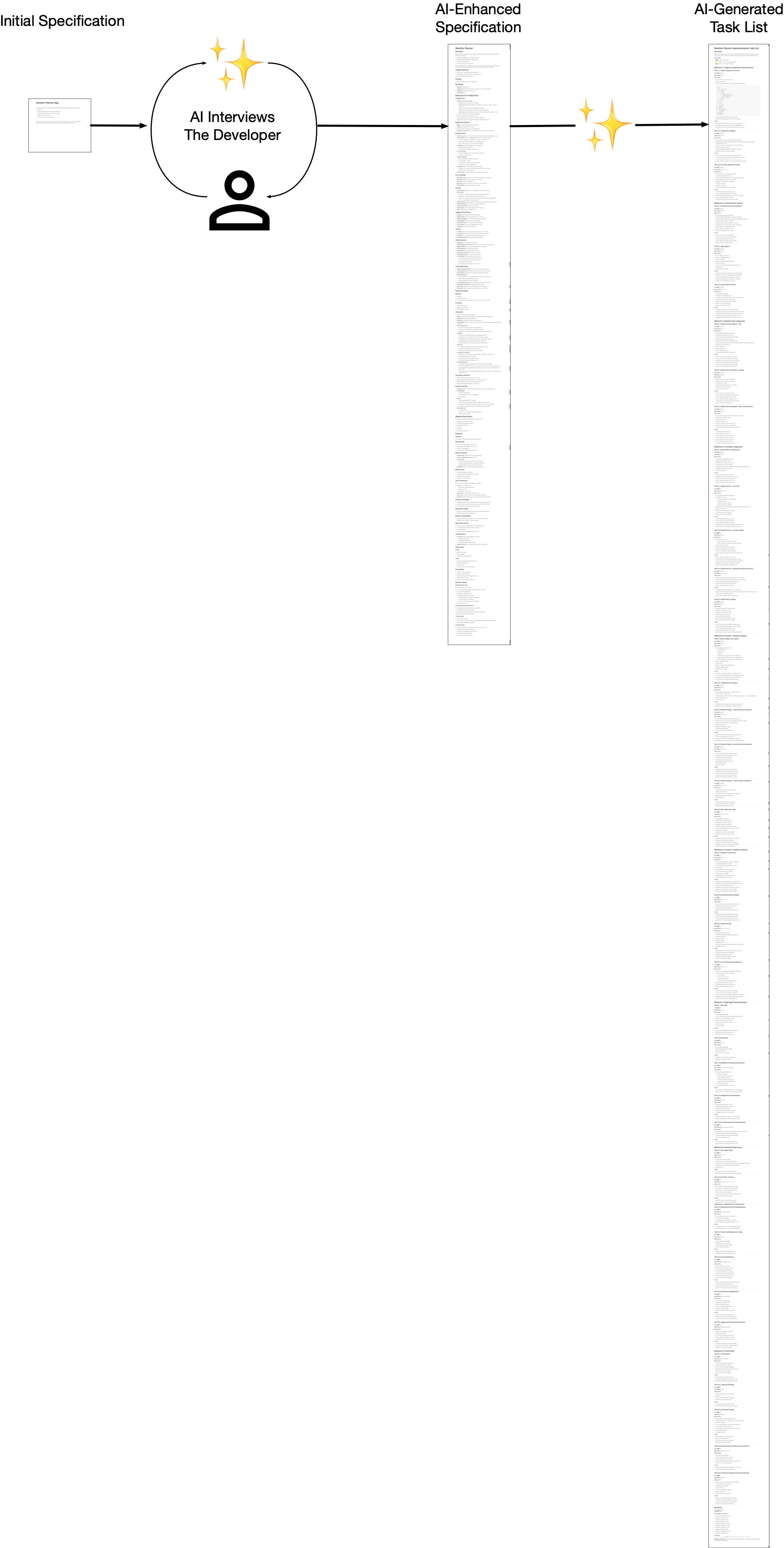
It’s astonishing when you look at it this way. When you hear people talk about the productivity boost of AI coding tools, it can be hard to get an intuitive sense of what and why that is. But in the graphic above, you can see a clear representation of the tremendous boost AI gives you in building software.
After I gave it the final prompt, it generated a draft app. It had a few simple issues, and Claude and I worked through them. Some examples: there were a few UI alignment issues, and a chart rendering problem, and an issue with geolocation. I called them out and had Claude Code fix them.
All in all, the build phase took about an hour, so I’d give it a total of two hours total from scant spec to working MVP.
Here is the final result:
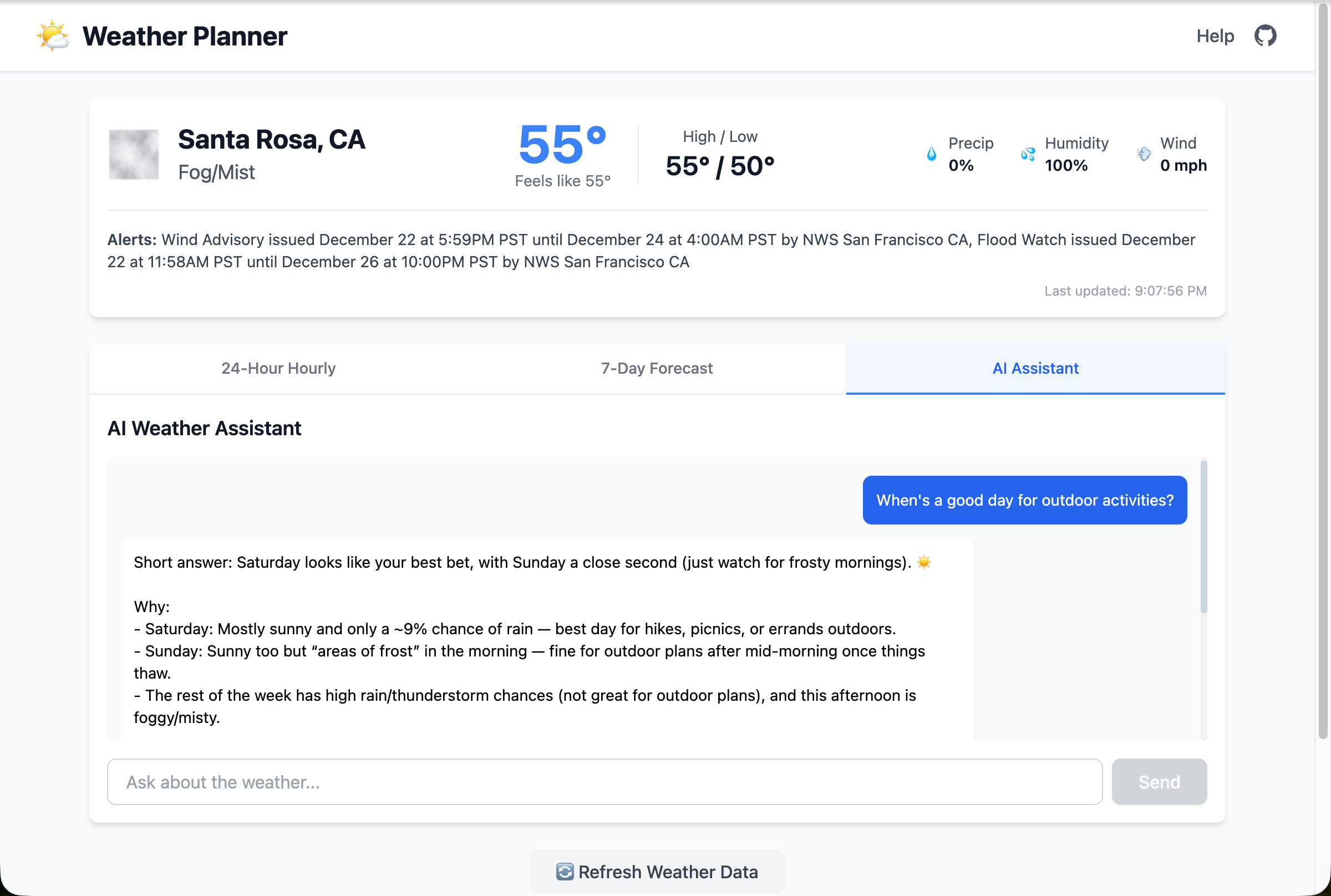
That’s probably better than what I initially had in mind, which is pretty amazing given how little I started with: a 10 line, bullet point description. And you can see the difference between it and the app created when I just told it to build the app from the initial spec without the intermediate steps.
Final Thoughts
It can seem odd that:
Spec → ✨ → Enhanced Spec → ✨ Task List → ✨ → Appproduces so much better of an app than:
Spec → ✨ → AppBut the first process takes advantage of a feature of LLMs: the more tokens you generate, the more “thinking” AI does. We can take advantage of this behavior by having AI spend more time thinking about first what to build and then how to build it before it actually starts to build it. In addition, the prompts open up more opportunities for AI to ask you questions to get a clear understanding of the goals, which helps in producing a better aligned and higher quality result.
This process of inserting a round AI asking you lots of questions is applicable in many situations, and feels like it’s doing things more in keeping with “AI way”. Without a doubt, writing a complete specification, by hand, is no more the AI way than writing the entire application, by hand.
Having AI write the specification has the strong advantage that the spec-writing AI’s concerns are going to be roughly the same as the ones the programming AI has when building out the application. So, in effect, you’re asking AI to list all its decision points in building the app, without yet building it, and getting your feedback on each. That helps ensure it builds precisely what you want.
There are other sources of information AI can consume besides just an interview with you. You can provide user stories, emails, transcripts of calls, notes, etc., all as grist for the mill. And you can have multiple rounds of interviews as new information comes in. This is not a dogma, it’s a tool you can adapt to your situation. But at its simplest, the process can take a minimal wish list and do a good job of rendering it as an application.
Net net:
If you’re still at the vibe-coding stage of using AI and finding it hard to get the kind of app you want, try out these three prompts in this article (building out the spec, then building the task list, then executing on it). They are very simple additions that can quickly get you past that sticking point and start producing solid results.
Later on, you can dive down the rabbit hole of agents and skills and so on if you wish, or you may find just a few tweaks to these prompt are all you need for now.
Let me know if you try them and how they work for you!
Some reference material if you wish to dig deeper:
Anthropic’s Claude Code Best Practices talks about various ways to build processes for writing code, including how to create a project plan as a separate step from writing the code.
“How Agents Plan Tasks with To-Do Lists”, which discusses the structure of todo lists.
Harper Reed’s “My LLM codegen workflow atm”, which outlines the process for growing a spec from the germ of an idea.
“THE SECRET WEAPON FOR BETTER AI RESPONSES: ASK UNTIL YOU’RE 95% SURE” which discusses the idea of having AI ask clarifying questions.
“Large Language Models Should Ask Clarifying Questions to Increase Confidence in Generated Code”
“Claude Requirements Gathering System”, a plug in to Claude Code to manage requirements.
Nicely written. That is basically my experience working with AI on coding, whether it is net new or something I need modifying. The spec piece is important because otherwise, AI will be out of control and hallucinating at the same time, and you will be spending a lot more time telling it it's stupid. Another thing developers should remember is that AI code in textbook coding, which is a plus and a minus. A plus, because the code will be written to cover all the cases, even those you know your app will "never" get to that place. A minus because of the same reason - and the code, maybe something as simple as the BASIC "10 Print "I am with Stupid" 20 GOTO 10" and AI will generate 1/2 a page of code because of its "textbook" brain. =)
Maybe the key is to realized that there are more than 1 way to get the AI to do what you want, you just have to experinment with it and figure out what works for you and what don't