
Getting JSON Back From GPT
Letting the Computer Know What to do Next

We’re on the cusp of greatness!
Well, if not exactly greatness, maybe complete-enough-ness?
Last week, we built a process that recommends the type of life insurance a customer needs. The recommendation was in a lovely, text format, as ChatGPT is wont to do. But if you’re the OmniScript, how do you know what was recommended? You have a mess of text.
The answer is to get ChatGPT to return a JSON structure that the computer can read instead of free text. Actually, that’s not quite right: we want both the text for the user and the structure for the system:
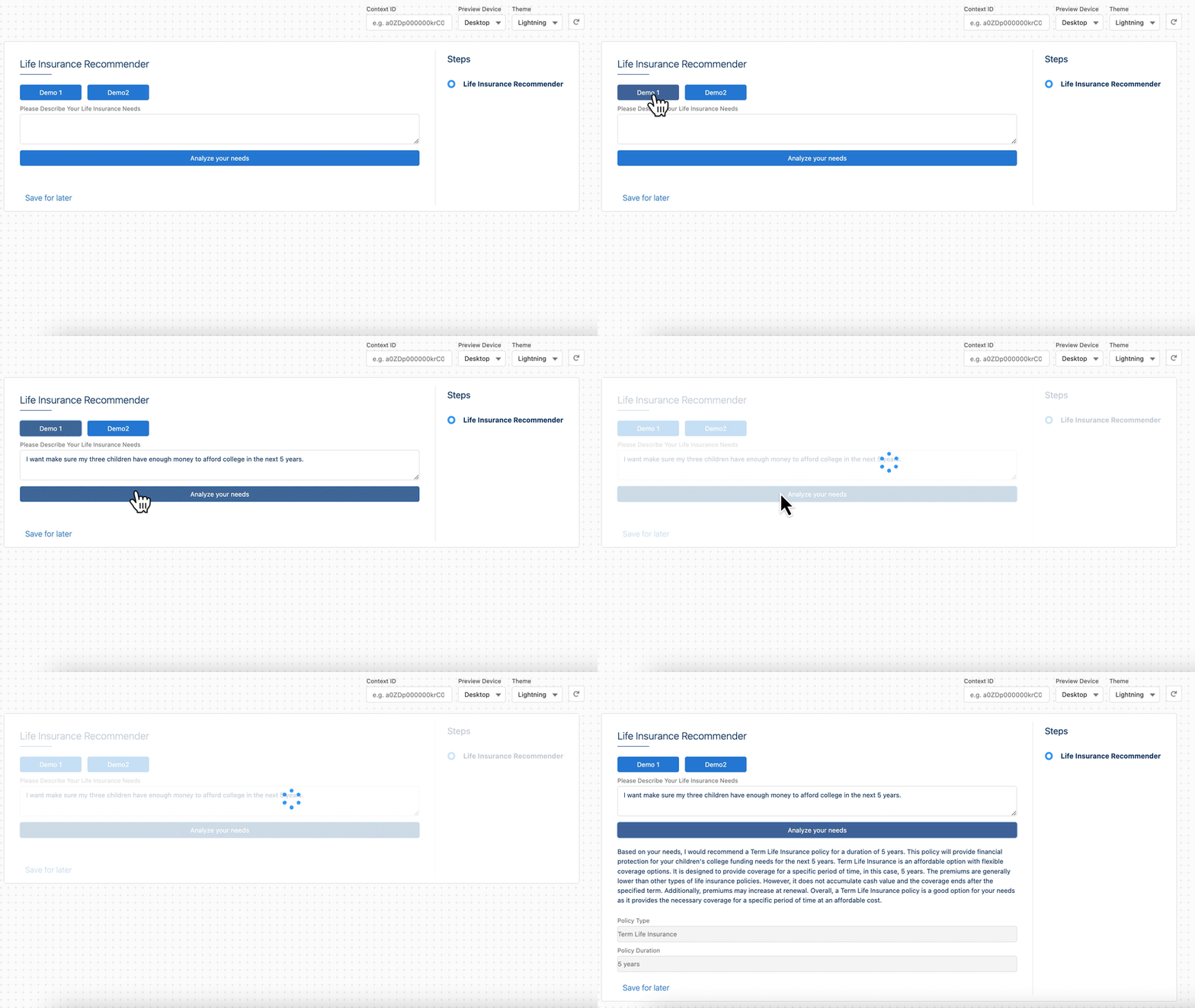
The way this demo does it is to return everything in a JSON structure so that we can populate different parts of the UI with relevant information. Let’s first install this demo and then we can explore how it works.
If you’re not a subscriber, why not join?
Setting up the Demo
There are two things you need to do to run this on your own:
Create a named credential as described in Tuesday’s post.
Import the appropriate datapack from this post’s GitHub repository.
When import the datapack, you should activate the Integration Procedure but skip activating the OmniScript. That way you can preview and modify the OmniScript as you see fit.
How Does This Work?
The most important thing in all of this is getting Chat GPT to return the results as a JSON structure rather than as just text. And the trick to this, it turns out, is to ask nicely. Here’s the prompt that we’re using:
You are an experienced life insurance agent. It is your job to recommend the best policy type for your customer, based upon their needs.
In addition, for the type of policy you recommend, you should describe it's pluses and minuses in detail and be explicit about how it works.
A customer will tell you what they need in the way of life insurance. From their needs, you should be able to understand how long they need insurance for, what the purpose is, and whether they are looking for the cheapest insurance or one that is more expensive but with more value.
Your response should be in JSON, and include the following elements:
* policy_type
* policy_duration
* purpose
* pluses, an array of advantages
* minuses, an array of disadvantages
* full_text, the complete explanation of all elements of the recommendation
This is held in the opening set values in the OmniScript:
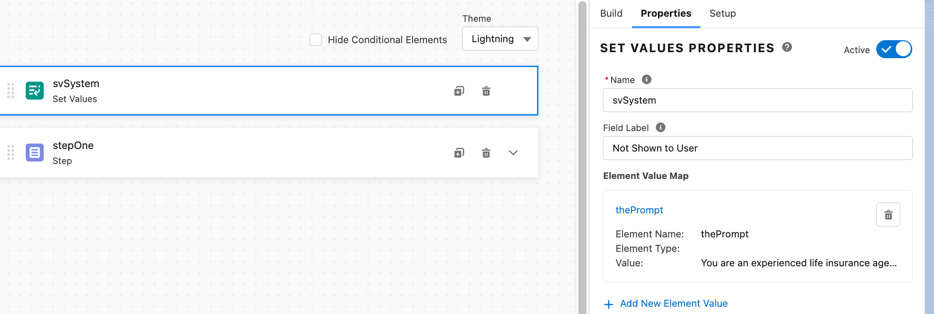
The string is pretty large and you’ll notice I’ve explicitly embedded \n characters to indicate the end of lines. This seems1 critical to get ChatGPT to properly understand our prompt.
There’s a couple of other things worth understanding:
First, when the result comes back from ChatGPT, it’s not technically JSON; it’s a string holding a JSON, aka a serialized JSON. In the revised integration procedure, we have to convert that string back to a real JSON structure:

That’s a set values where the value is:
=DESERIALIZE(%callGPT:choices|1:message:content%)
That basically reaches into the returned result, pulls out the string, and converts it to JSON.
The second tricky thing is that the integration procedure returns the results in an object called Response; but that doesn’t map directly into anything in the OmniScript. To achieve that mapping we could have done a couple of things:
We could run it through a transformation DataRaptor to map everything into the fields we want. I didn’t do that just to keep the example to the IP and OS; but it’s otherwise a perfectly fine approach.
We could have named the step “response” and all the fields on the step to match. That creates a lot of weird dependencies that are hard for people to notice, though.
We could pull the values out of response and display them in differently named elements. That’s what I did.
For the narrative text that comes back (that explains the recommendation), I pull that out by creating a text area whose contents are “%response:full_text%” — in other words, it just displays whatever comes back in the full_text element of the response.
For the two fielded values (policy type & duration), I use formulas with expressions of:
%response:policy_type% and %response:policy_duration%
The nice thing is that you can use the values of the formulas elsewhere (perhaps show a step conditionally on the type of policy) without concern about where they got the values from. In fact, I make the visibility of the formulas in the UI conditional on their being values for them.
What Else Can We Do?
This is a bare bones example to show how to get structured data back. That’s just the start though, not the end.
Here are just a few simple ideas on what you can try next:
In the OmniScript, you could enable the appropriate next steps based upon the type of insurance selected. For example, you could have separate steps for term, whole, and universal life insurance that could solicit information germane to each of these policies as part of buy flow.
We also asked for (and get) a list of pluses and minuses, but did not display them. You could add those into the OmniScript.
Obviously this doesn’t need to be for life insurance, you can pick some other well known area.
You could play with the prompt to get it to return not generic names for life insurance types, but your branded names.
You don’t even have to have it be a product recommender. You could feed it text and ChatGPT to do both sentiment analysis as well as entity and intents extraction.
Concluding Thoughts
This gets us to the point where we have a foundation for building useful, realistic applications (or demonstrations) integrating Salesforce+OmniStudio and ChatGPT. I hope you see how really simple it is to get something running. It will be more work to make it more production ready (there’s no error handling, for example, and OpenAI API’s love to time out, so we cannot ignore that), but those things represent more known knowns.
Let me know how you’re progressing2, what’s working, what’s not, and what you’re interested in. For the next few weeks, I hope to focus on our getting stronger at prompt engineering and then on to fine tuning models to make them more tailored to specific needs.
Know someone else who wants to be a wizard at CRM and AI? Help me and help them by sharing this post and the entire substack with them! Thank you!
Resources You Might Need
Do you need either a Salesforce Org with OmniStudio or an OpenAI API Key? Start with this post:

Do you need to create a named credential?

Seems, as in if I don’t do it it doesn’t work.
Or if you’re not, I want to know.
Ok. This is incredibly helpful. I am eyeing a very practical Omnistudio implementation of AI for Salesforce Media Cloud. I want the input to come from several fields on the Oppty Object - then recommend a very prescriptive “Quote” to be created. So it would seem possible, just a lot of DRs to transform, and some conditionals to figure out what do do if/when there are 3 line items or 12 or 1?